
A ClickUp implementation is more than a workspace setup. It’s the process of designing a complete project delivery system, one where your workspace structure, workflows, taskflows, and dashboards work together, supporting how your team delivers from day one.
I’m Laura, a ClickUp Implementation Consultant working with agencies, consultancies, and service businesses across the World. Whether you’re building ClickUp from scratch or untangling a workspace that’s grown messy and inconsistent over time, I design ClickUp systems that are clear, scalable, and built around how your work actually flows.
What a ClickUp Implementation Covers
A complete ClickUp implementation covers four connected areas. Each one matters, and together they form a project delivery system that supports your team instead of slowing them down.
ClickUp Workspace Setup
A well-structured ClickUp workspace is the foundation everything else depends on. Without it, even the best workflows and automations become confusing and hard to maintain.
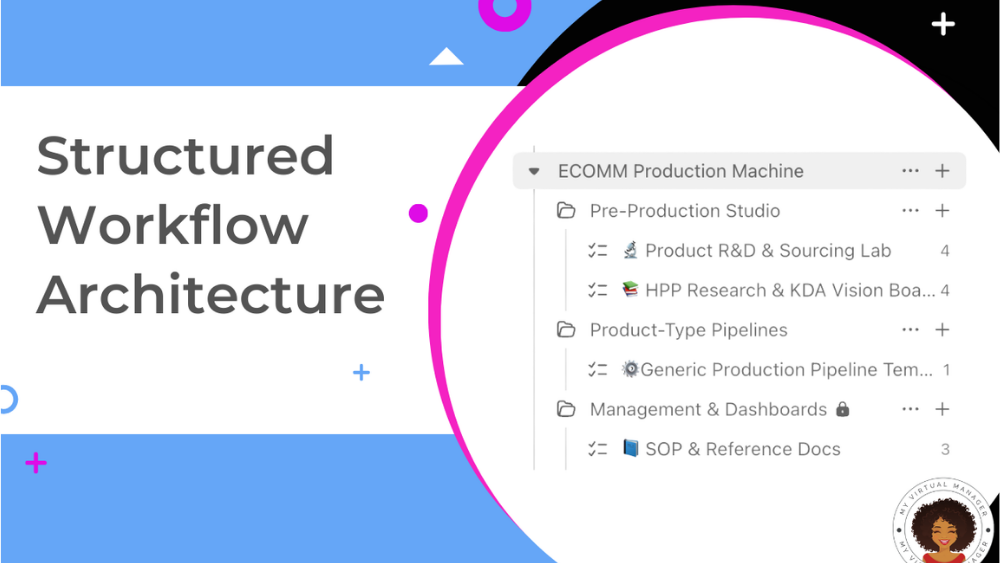
Workspace setup includes:
- Space, Folder, and List hierarchy aligned to your business units, teams, or services
- Role-based permissions, access controls, and user configuration
- Naming conventions, housekeeping rules, and template defaults
- A clean, minimal structure that’s intuitive for new joiners and scales as you grow
Even the best ClickUp workflows fail if the workspace they live in is inconsistent or cluttered. Getting the foundational setup right reduces onboarding friction, supports governance, and gives your system somewhere solid to build from.
ClickUp Workflow Design & Management
ClickUp workflow management is about more than keeping tasks moving. It’s about creating a structured project delivery system that supports consistent execution, clear ownership, and real delivery visibility across teams.
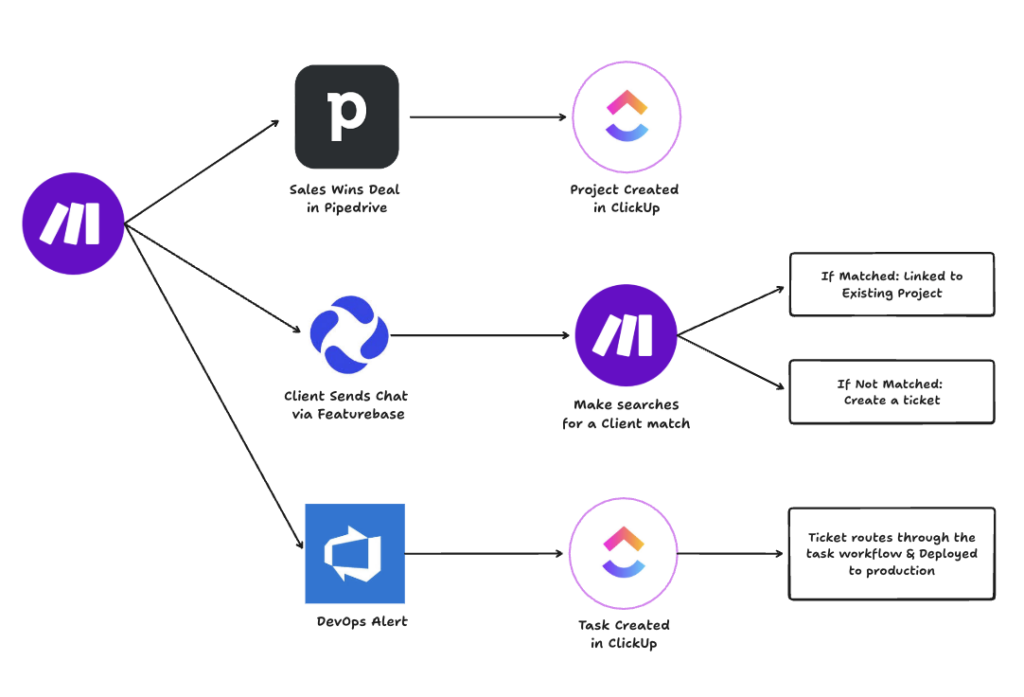
Effective ClickUp workflow design ensures:
- Work is easy to find and track from intake to completion
- Responsibilities are clear at every stage
- Bottlenecks surface early, before they impact delivery
- Reporting reflects what’s actually happening — not what should be
My approach starts by mapping how work really flows today — including approvals, edge cases, and dependencies — before designing a structure that reflects reality rather than theory. I then streamline the workflow by removing unnecessary statuses, standardising task setup across projects, and introducing automation only where it adds genuine value.
ClickUp Taskflows & Templates
Taskflows define how individual pieces of work move from intake to completion. Well-designed ClickUp taskflows reduce delivery bottlenecks, prevent handoff errors, and make ownership clear at every stage.
Each taskflow is built as part of the wider delivery system and includes:
- Logical task statuses and transitions tailored to your process
- Custom fields to capture task metadata — priority, type, department, deadlines
- Dependency links, start and due date logic, gating, and automation triggers
- Task templates and workflows for repetitive or recurring task types
Taskflows give clarity to assignees and stakeholders alike — minimising ambiguity and improving throughput without adding complexity.
ClickUp Dashboards & Reporting
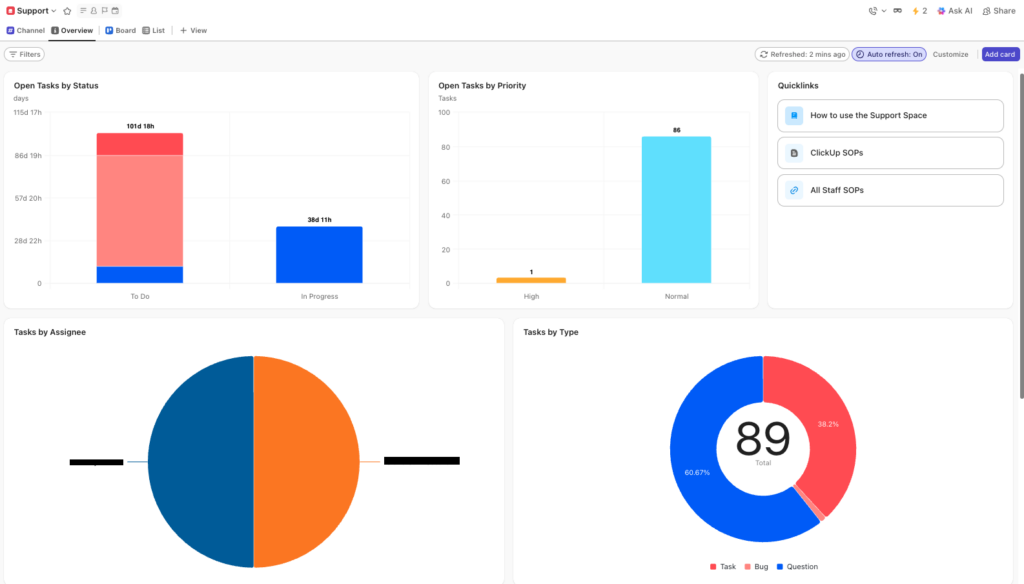
Dashboards are only useful if they surface the right information at the right level. A ClickUp dashboard built as part of a complete implementation shows what matters — delivery status, workload, bottlenecks, and priorities — so teams and leaders can take action without digging through tasks and lists.
Dashboards are designed around the decisions they need to support:
- Delivery teams need day-to-day task visibility and workload balance
- Project managers need status, blockers, and progress at a glance
- Leadership needs high-level delivery health and output trends
Dashboards also support ongoing workflow optimisation — highlighting where work is slowing down or backing up so your team can adjust before delivery is impacted.
Why ClickUp Implementations Break Down
Many teams come to me when ClickUp starts to feel heavy rather than helpful. Common signs include:
- Workflows that rely on manual chasing and follow-ups
- Inconsistent task setup across projects or teams
- Unclear handoffs between roles or departments
- Dashboards that look good but don’t drive decisions
- Work getting “stuck” without obvious reasons
These problems rarely come from ClickUp itself. They come from workspaces and workflows that were never designed as a connected system.
Who This Is For
ClickUp implementation is the right fit if:
- You’re setting up ClickUp for the first time and want to get the foundations right
- You’re already using ClickUp but delivery still feels messy or inconsistent
- Your team relies on manual follow-ups to keep work on track
- Workflows vary across projects with no standard way work gets done
- You want ClickUp to function as a project delivery system, not just a task list
This service is particularly well-suited to agencies, consultancies, and growing service businesses where delivery quality and team clarity directly affect client outcomes.
How a ClickUp Implementation Works
Every implementation follows the same structured approach — practical and built around how your business actually operates.
- Discovery & Workflow Mapping — I map how work moves today, including your work types, approvals, handoffs, and edge cases
- Workspace Architecture Design — I design your Space, Folder, and List hierarchy aligned to your teams and services
- Workflow & Taskflow Build — I configure workflows, statuses, custom fields, task templates, and automations in ClickUp
- Dashboard Configuration — I build dashboards tailored to your delivery team, project managers, and leadership
- Testing & Iteration — Workflows are tested against real delivery scenarios before sign-off
- Training & Handover — Your team is trained on the system, with documentation to support ongoing management
Frequently Asked Questions About ClickUp Implementation
How long does a ClickUp implementation take?
Timescales vary depending on complexity. Most implementations range from two to six weeks. A focused workspace setup for a smaller team can be completed faster, while a full project delivery system build for a larger agency typically takes longer. A scoping session will give you a realistic timeline for your situation.
Can you implement ClickUp for an existing workspace?
Yes. Many clients already have a ClickUp workspace that’s grown cluttered or inconsistent over time. I audit the existing setup, identify what’s working and what isn’t, and redesign the structure, workflows, and dashboards to better support delivery — without starting from scratch unless that’s the right approach.
What does a ClickUp implementation include?
A ClickUp implementation covers workspace setup (Spaces, Folders, Lists, permissions), workflow design, taskflow configuration, and dashboard build. Each element is designed as part of a connected project delivery system — not as isolated features. The goal is a ClickUp workspace that supports how your team actually works.
Do you offer ClickUp implementation services in the UK?
Yes. I work with agencies and service businesses across the UK, as well as remote teams internationally. All implementation work is delivered virtually, with workshops, reviews, and handover sessions conducted online.
Is ClickUp implementation right for growing teams?
Especially so. Growing teams are most at risk from workflows that weren’t designed to scale — where inconsistency, manual chasing, and knowledge gaps emerge as headcount increases. A well-designed ClickUp implementation creates consistency, supports onboarding, and ensures delivery doesn’t rely on individual knowledge or manual coordination.
How does ClickUp implementation support project delivery?
A ClickUp implementation builds the infrastructure for reliable project delivery. Clear workspace structure, defined workflows, consistent taskflows, and accurate dashboards combine to give teams confidence that work will progress predictably — and give leaders the visibility to manage delivery across multiple projects and clients.
Can you review my existing ClickUp dashboards?
Yes. Some teams need dashboards designed from scratch; others already have dashboards that aren’t providing useful insight. In both cases, I start by reviewing your workflows and delivery needs before designing or refining dashboards that genuinely support clarity, accountability, and delivery outcomes.
Ready to Build a ClickUp System That Works?
30–45 minutes. Practical guidance. No obligation.